[AI Sparks] Issue 5: Unlock AI's Secret Language: Build with JSON
Welcome back to AI Sparks!
So far, we've built a chatbot that can hold a conversation. But what if we could turn our AI from a simple chat partner into a powerful tool that can do real work for us? Imagine an AI that scans a messy block of text from your history textbook and instantly pull out the key dates, figures, and events. Or an app that reads a product review and extracts the item's name, the star rating, and a list of its pros and cons. That's the power of structured data, and the secret to unlocking it is a language called JSON.
Today, we're going to move beyond building chatbots and start building real, practical AI tools using JSON. By the end of this issue, you'll have a script that can take a wall of messy notes and automatically transform it into a perfectly structured study guide.
Inside this Issue:
- 📡 AI Radar: Google Unveils Gemini 3.0: A New Era for Builders
- 💡 Concept Quick-Dive: Structured Data with JSON
- 🛠️ Hands-on Lab: Build an AI Study Guide Generator
- 👥 Community Spotlight: Resource: Mastering Python's JSON Library
📡 AI Radar: Google Unveils Gemini 3.0: A New Era for Builders
What Happened?
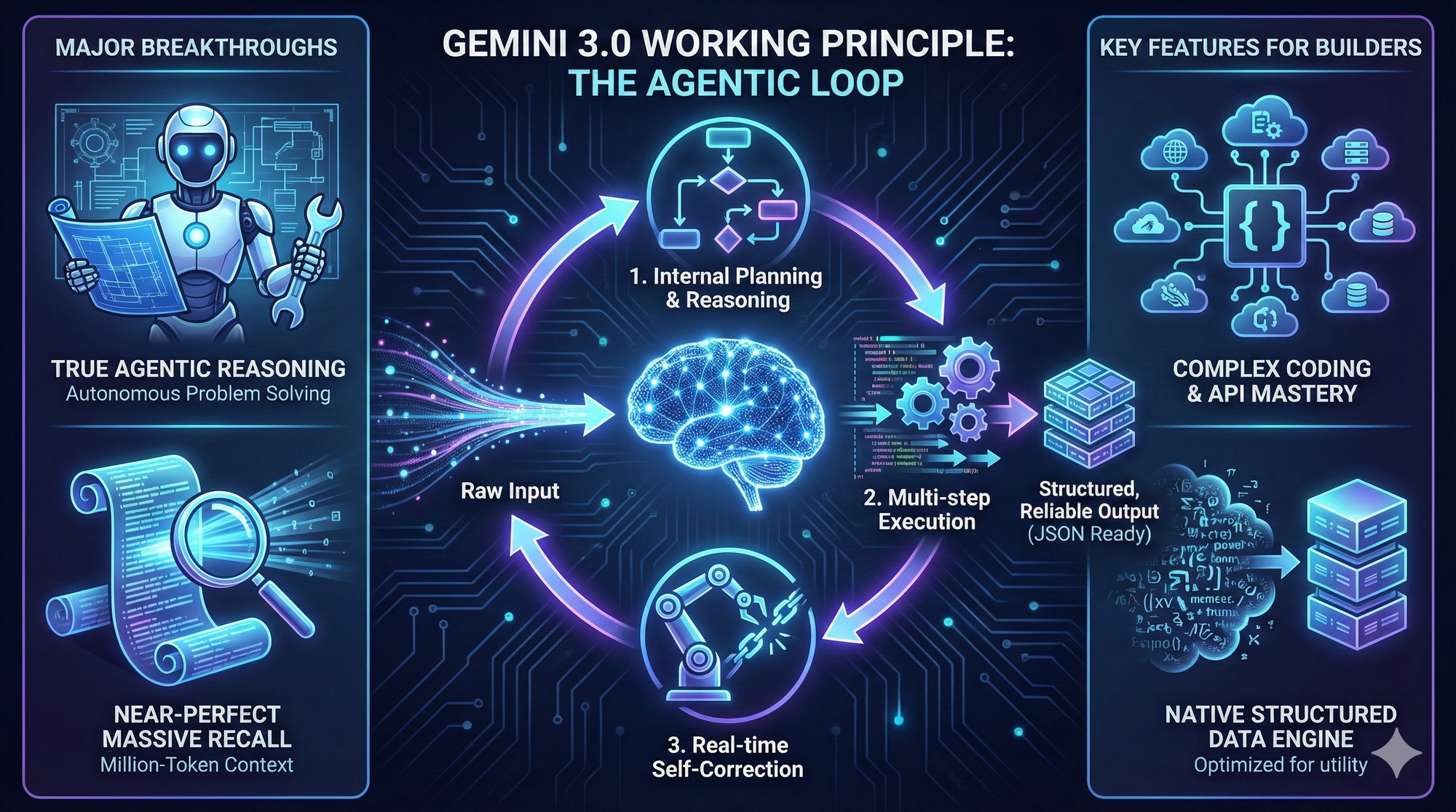
Google just dropped a bombshell with the release of Gemini 3.0, their most capable AI model to date. While previous iterations focused on chat capabilities, Gemini 3.0 represents a fundamental shift in architecture. As illustrated in the diagram above, it introduces three major technical breakthroughs:
- The Agentic Loop (Plan, Act, Correct): Unlike previous models that process linearly, Gemini 3.0 operates in a feedback loop. It can internally plan a multi-step task, execute it, and—crucially—self-correct in real-time if it detects an error, much like a human developer would.
- Near-Perfect Massive Recall: Think of this as an infinite digital memory. The model features a massive context window (Issue #4) with near-perfect retrieval, allowing it to "read" entire textbooks or codebases without forgetting the details.
- Native Structured Data: This is the engine for builders. As shown in the "output" stage, the model is optimized to move beyond messy text clouds and produce clean, reliable JSON and complex code by default.
Why It Matters:
This release confirms that the "AI Arms Race" is accelerating, not slowing down. But the most important takeaway isn't just the model's IQ—it's the focus on utility. Models like Gemini 3.0 are being optimized to work seamlessly with code, APIs, and structured data. They are moving from being "chatbots" to being "engines" for the next generation of software.
The "So What" for Students?
This reinforces everything we talk about in AI Sparks. The future belongs to those who can build with these tools, not just chat with them. The release of Gemini 3.0 means the "engine" you have access to just got a massive upgrade. By learning foundational skills like API integration and structured data (which we're covering today!), you are positioning yourself to harness this incredible new power to build applications that were impossible just a few months ago.
💡 Concept Quick-Dive: Structured Data with JSON
Until now, for every prompt we've sent, we've gotten a single string of plain text back from the OpenAI API. That's great for a chatbot, but it has a major limitation in practical AI tools. Often, users don't just want one piece of information; they want several.
Imagine an AI-powered study guide app where students paste in their messy lecture notes. The app doesn't just return a summary; it also extracts key terms and generates potential practice questions from the notes. To build an app like that, our program needs to receive the information from AI as separate, distinct pieces of data. If the AI just returns one long string, our code would have to use complex and unreliable methods to guess where the summary ends and where the questions begin. It's messy and likely to break.
The solution is structured data, and the industry standard for that is JSON (JavaScript Object Notation). JSON is a lightweight format for storing and transporting data. It's used everywhere in software development, especially for sending data from a server to a web page or, in our case, from AI to our Python script. It's designed to be easy for humans to read and for machines to parse.
1. Creating a JSON Object
A JSON object is enclosed in curly braces {}, and the data inside is organized in key-value pairs. A "key" is a label (always a string in double quotes), followed by a colon :, and then its "value." Multiple key-value pairs are separated by commas. If you're familiar with Python, this should look very familiar—the syntax of a JSON object is almost identical to a Python dictionary. The main differences are that in JSON, keys must always be in double quotes ("key"), and it uses lowercase true, false, and null instead of Python's capitalized True, False, and None.
Let's build up from a simple example to a more complex one.
Simple Key-Value Pairs: Here, the keys are two strings. The values are just a string and a number.
{
  "name": "Alex",
  "student_id": 12345
}
A Value as an Array: The value can also be an array (which is like a Python list), enclosed in square brackets [].
{
  "major": "Computer Science",
  "courses": ["Intro to AI", "Data Structures", "Calculus II"]
}
A Complex JSON Object: Now let's combine them. This complex JSON object uses strings, a number, a boolean (true/false), and an array as values. This is the same structure we'll ask our AI to create.
{
  "name": "Alex",
  "major": "Computer Science",
  "student_id": 12345,
  "is_full_time": true,
  "courses": ["Intro to AI", "Data Structures", "Calculus II"]
}
2. Accessing Data in a JSON Object
When our Python program receives data from AI in JSON format, it arrives as a single string of text. To work with this data effectively, the common practice is to convert this JSON string into a Python dictionary. Python has a built-in json library that makes this easy. The primary method we'll use is json.loads() (which stands for "load string"). It takes a JSON string as input and returns a Python dictionary.
Using the complete example above, after converting the JSON object into a dictionary and storing it in a variable called student,
student["name"]would give us"Alex".student["courses"]would give us the list["Intro to AI", "Data Structures", "Calculus II"].- To get the first course, we'd use chaining:
student["courses"][0], which would give us"Intro to AI".
🛠️ Hands-on Lab: Build an AI Study Guide Generator
By the end of this lab, you'll have a Python script that takes a block of unstructured text like class notes and uses AI to generate structured study guide in JSON format, which we'll then parse and print beautifully.